
Every clothing boutique owner knows the question shoppers ask most: “How would this look on me?”
Professional product photos and styled flat lays answer part of it. They show colour, fabric, and detail. But they rarely show how a dress moves on a real body, how a sweater fits someone who is not a model, or how a customer styled a piece for a weekend away.
Customer photos fill that gap. When a shopper sees a real customer wearing a top they are considering, the question changes from “Will this work?” to “I can see myself in that.”
Shoppers actively look for this kind of proof. In PowerReviews’ survey of 15,870 US consumers, 60% said they always search for customer photos and videos before buying, up from 50% in 2021. Among the main reasons, 72% wanted a better sense of size and fit.
So, can customer photo reposts increase sales for local clothing boutiques?
Yes, when they are done with permission and purpose. Reposting customer photos shows real fit and real style, builds trust in your boutique, and turns happy customers into a steady source of authentic content.
The goal is not to fill your feed with random tagged photos. It is to build a system that collects, selects, and shares customer photos that help the next shopper decide.
Direct Answer: Why Do Customer Photo Reposts Drive Boutique Sales?
Customer photo reposts drive sales because they answer the fit and style questions that stop shoppers from buying.
A boutique’s own photos are expected to look good. A real customer’s photo carries more weight, because it shows the piece in ordinary light, on an ordinary body, styled the way a normal person would wear it.
The research backs this up. In a Bazaarvoice survey of 8,051 consumers, 74% said they prefer seeing previous customers’ photos and videos over professionally shot images, and 62% said they are more likely to buy when they can see both. PowerReviews found that 91% of shoppers are more likely to buy a product that has customer photos or videos.
For a local boutique, reposts also do three things a product shot cannot:
- Show real fit. Shoppers see sizes on different body types and heights.
- Build community. Featured customers feel seen and often share the repost with friends.
- Prove the boutique is loved locally. Real faces from your town signal trust to nearby shoppers.
These surveys are about shopping behaviour broadly, not boutiques specifically. But the pattern is consistent: when shoppers can see real customers wearing a product, they feel more confident buying it.
Step 1: Make It Easy for Customers to Share
Customers will not tag you if they do not know you want them to. Build simple prompts into every part of the shopping experience.
Practical ways to invite photos:
- A small card in every bag: “Show us how you style it. Tag @yourboutique”
- A branded hashtag on your fitting room mirror and receipts
- A line in your order confirmation and follow-up emails
- A mention in your Instagram bio
- A quick verbal ask at checkout when a customer is clearly excited about a purchase
A well-lit corner or mirror with a simple backdrop can also become a natural “photo spot” in store. Many shoppers will take a picture if the setting looks good.
Step 2: Always Ask Permission Before Reposting
A customer tagging your boutique is not the same as giving you permission to repost their photo.
Before sharing, send a short message:
“We love how you styled this! Would you be happy for us to share it on our page? We’ll tag you, of course.”
Keep a simple record of who said yes, in a spreadsheet or saved DM screenshots. If you want to use a photo in paid ads, on your website, or in printed materials, ask separately and get clear written agreement.
Always credit the customer by tagging them in the image and the caption. Never crop out their tag, add filters that change how they look, or edit their body.
Step 3: Choose Photos That Answer Shopping Questions
Not every customer photo is equally useful. Prioritise photos that help another shopper decide.
The most valuable reposts show:
- How a piece fits different body types and heights
- How it looks in natural light, not studio lighting
- Different ways to style the same item
- Real-life occasions, such as weddings, holidays, work, or weekends
- Pieces that are currently in stock
Add useful detail to the caption: “Jess is 5’4″ and wearing a size M in the linen wrap dress.” Size and height details often matter more to shoppers than a perfect photo.
Step 4: Link Every Repost to a Way to Buy
A repost should make it easy to act on the inspiration it creates.
In each caption or Story, include:
- The product name and price
- Sizes or colours still available
- A product tag, link sticker, or direct link to the item
- Whether it is available to try on in store
If you sell online, set up Instagram and Facebook product tagging so shoppers can tap through to the item. If you sell mainly in store, a simple “Available in store now, ask for the linen wrap dress” still turns interest into a visit.
Remove or update reposts when a product sells out, or point shoppers to a similar piece.
Step 5: Use Stories, Highlights, and the Grid Differently
Each format has a different job.
- Stories: Share customer tags quickly and often. They feel casual and immediate.
- Highlights: Create a “Customer Style” or “As Worn By You” highlight so new visitors can browse real outfits anytime.
- Grid posts and carousels: Save your strongest photos for the main feed, such as a carousel of five customers styling the same piece.
- Reels: Turn several customer photos into a short “one piece, five ways” video, with permission from each customer.
A mix of formats keeps your content fresh while giving shoppers multiple ways to see real outfits.
Step 6: Celebrate Your Customers, Not Just the Product
Customer reposts work best when they feel like a celebration, not free advertising.
Captions can mention:
- The occasion they wore it to, if they shared it
- How they styled it with pieces they already owned
- A thank-you for choosing your boutique
Some boutiques run a monthly “Customer Style Feature,” with a small thank-you such as a discount on their next visit. Make it clear that customers are featured for their style and permission, not paid for positive posts.
If you offer an incentive in exchange for content, disclose it clearly in the caption so followers understand the relationship.
Step 7: Represent a Range of Customers
One of the biggest benefits of customer photos is showing that your clothing works for different people.
Try to feature customers across a range of:
- Ages
- Sizes and body shapes
- Styles and occasions
This helps more shoppers picture themselves in your clothes and signals that your boutique is welcoming.
Only feature customers who have agreed to be shared, and never comment on anyone’s body. Focus captions on fit, fabric, and styling.
Step 8: Use AI to Organise Photos and Measure Results
AI can help a boutique keep track of customer content and see which reposts actually sell.
Use it to:
- Sort tagged photos by product, category, or season
- Draft caption variations
- Summarise common fit questions from DMs and comments
- Plan a weekly mix of reposts and original content
Then track:
- Product link clicks and profile visits
- Saves and shares
- DMs asking about sizes or availability
- Online sales of featured items
- In-store sales of featured items, with staff noting when customers mention a post
Use AI only to organise real customer content. Never use it to create fake customer photos, alter how real customers look, or invent customer stories.
A repost that sells out a dress in your boutique is worth more than one that gets hundreds of likes and no sales.
Supporting Data and Real-World Examples
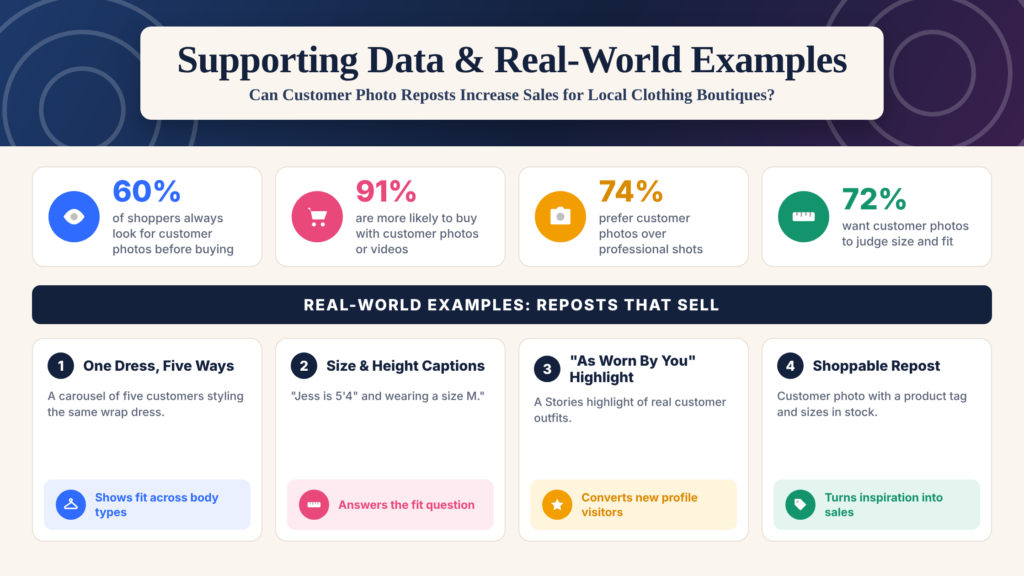
Shoppers increasingly rely on real customer photos before they buy, and fit is one of the main reasons.
Key figures:
- 60% of shoppers always search for customer photos and videos before buying, up from 50% in 2021 (PowerReviews, 15,870 US consumers).
- 91% are more likely to buy a product with customer photos or videos (PowerReviews).
- 72% of those who look for customer visuals want a better sense of size or fit (PowerReviews).
- 74% prefer seeing previous customers’ photos and videos over professional images (Bazaarvoice, 8,051 consumers).
For clothing boutiques, the fit finding matters most. Shoppers want to know how a piece will look on someone like them, and customer reposts answer that better than any product shot.
These figures describe shopping behaviour broadly, not boutiques specifically. Each boutique should track its own clicks, enquiries, and sales of featured items. The examples below are illustrative scenarios.
Example 1: One Dress, Five Ways
A boutique collects photos from five customers who bought the same wrap dress and, with each customer’s permission, shares them as a carousel.
Shoppers see the dress on different body types and in different settings, which makes it far easier to picture themselves wearing it.
Example 2: Size and Height Captions
Every repost includes a short fit note: “Jess is 5’4″ and wearing a size M.”
This simple detail answers the most common DM question before it is asked and gives hesitant shoppers the confidence to buy.
Example 3: The “As Worn By You” Highlight
The boutique saves every approved customer Story to a highlight called “As Worn By You.”
New visitors who land on the profile can browse dozens of real outfits in seconds, turning curiosity into trust.
Example 4: The Shoppable Repost
Each repost includes a product tag, the price, and the sizes still in stock, plus a note that the piece can be tried on in store.
Shoppers can move straight from inspiration to purchase, online or in person.
How to Turn One Customer Photo Into Multiple Posts
With permission, a single great customer photo can support several pieces of content:
- A Story repost on the day it is shared
- A grid post with a fit note and product tag
- A place in your “As Worn By You” highlight
- A slide in a “one piece, many ways” carousel
- A short Reel combining several customer looks
- A feature in your email newsletter
- A “back in stock” reminder using the same photo
- A monthly customer style roundup
This gives every approved photo a longer life and keeps your feed full of real outfits.
If you want a consistent stream of customer-led content without taking time away from the shop floor, Socinova’s social media management services cover planning, design, captions, and scheduling at a flat monthly rate.
Conclusion: Can Customer Photo Reposts Really Increase Sales for Local Clothing Boutiques?
Yes. Customer photo reposts can increase sales for local clothing boutiques by showing real fit, real style, and real customers who love the shop.
The most effective reposts are shared with permission, chosen to answer shopping questions, and linked directly to a way to buy. They celebrate customers rather than treating them as free advertising.
Make sharing easy. Ask before reposting. Add fit details. Represent a range of customers. Then track clicks, enquiries, and sales of featured items, not just likes.
Show the fit. Credit the customer. Make it shoppable. Keep it real.
That is how a customer’s photo turns into your next sale.