
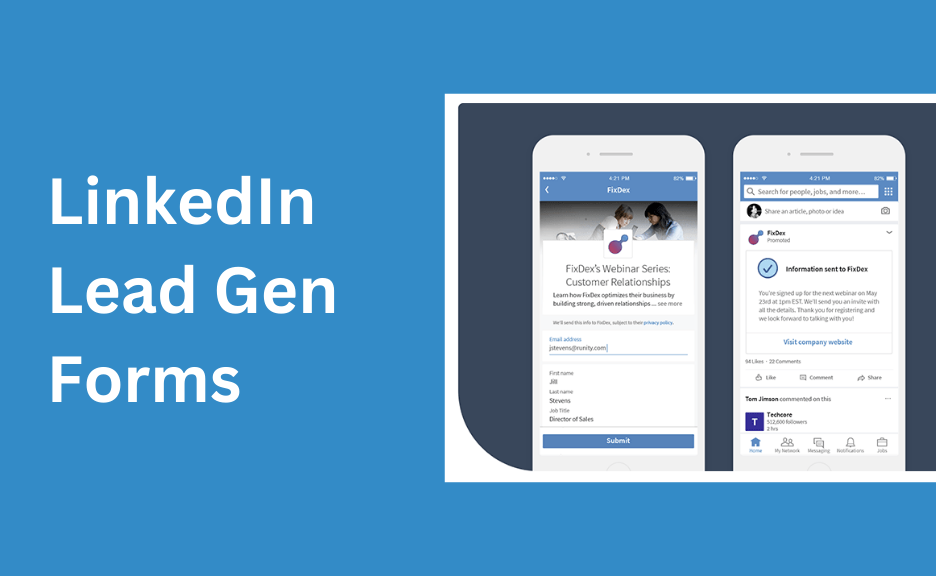
If your LinkedIn Lead Gen Form isn’t capturing email addresses correctly, it’s often due to field mapping issues, privacy settings, incomplete user profiles, or CRM sync errors. Reviewing your form setup, testing the workflow, and checking integration logs will help resolve missing email data and recover your lead flow.
LinkedIn Lead Gen Forms are valuable for capturing high-intent leads without redirecting users off the platform, but sometimes email addresses are missing, empty, or incorrect in your CRM or downloaded CSVs.
Here’s a structured guide to diagnose and fix why your LinkedIn Lead Gen Form isn’t capturing email addresses correctly.
1. How LinkedIn Captures Email Addresses in Lead Gen Forms
- LinkedIn pre-fills the lead form fields using data from a user’s profile.
- For the email field, LinkedIn pulls the primary email address associated with the user’s account.
- Users can edit the form before submission, including removing their email or entering a different one.
Understanding this workflow helps clarify where data can break.
2. Possible Reasons Email Addresses Are Missing or Incorrect
A. User Profile Limitations
- Users may not have a primary email on their LinkedIn profile (rare but possible).
- Users may use an outdated or non-business email in their LinkedIn profile.
- Users may manually remove or modify their email before submission.
B. Field Mapping Issues
- Your Lead Gen Form may not have the “Email” field correctly added.
- If using custom fields or renaming the email field, your CRM or integration may not map it correctly.
C. Integration Sync Errors
- If you’re using Zapier, HubSpot, Salesforce, or other CRM integrations:
- The field mapping may be missing or misaligned.
- API token or app permissions may not include email access.
- Rate limits or API failures may cause incomplete data syncs.
D. Privacy and Permissions
- Users can adjust privacy settings limiting data sharing, but LinkedIn generally passes email addresses unless users opt out.
- Account-level restrictions in your ad account may prevent field-level data export if you lack admin permissions.
3. Step-by-Step Troubleshooting
Step 1: Verify Form Field Inclusion
- Go to LinkedIn Campaign Manager → Account Assets → Lead Gen Forms.
- Edit the problematic form.
- Ensure the “Email Address” field is added and mapped correctly (using the standard LinkedIn field).
Step 2: Test the Form
- Preview your Lead Gen Form as a user.
- Submit a test lead and download the CSV to confirm if the email populates.
- Check if the email captured matches your LinkedIn profile email.
Step 3: Review CRM/Integration Mapping
If using CRM sync (HubSpot, Salesforce, Zapier):
- Check your integration’s field mapping:
- Confirm the LinkedIn “Email” field maps to the correct CRM email field.
- Reauthorize the integration if necessary to refresh permissions.
- Check integration logs for errors during sync.
- If using Zapier:
- Review your Zap trigger to ensure it captures the “Email” property.
- Add filters or cleanup actions to handle partial data if needed.
Step 4: Download and Inspect Raw CSV Data
- Download the raw lead CSV from LinkedIn Campaign Manager.
- Check if emails are present in the CSV:
- If present in CSV but missing in CRM, it’s an integration issue.
- If missing in CSV, it’s a form or profile-level issue.
Step 5: Check Permissions
- Confirm your LinkedIn account has admin access to download and view lead data.
- If using a shared ad account, ensure your user role has sufficient permissions.
Step 6: Review LinkedIn Privacy Policies
- Understand that while rare, users can opt out of sharing specific profile data.
- Users can delete or change pre-filled data before submission.
4. Best Practices to Prevent Missing Emails
- Always include the default LinkedIn “Email Address” field rather than creating a custom email field.
- Test forms before launching campaigns to ensure data capture.
- Encourage users in ad copy to keep pre-filled details unchanged for a smoother follow-up process.
- Periodically test CRM integrations to confirm lead data flow integrity.
- Use a double-check workflow in your CRM to flag leads missing an email for manual resolution.
5. When to Contact LinkedIn Support
If:
- Emails are missing from CSV downloads despite form inclusion.
- The issue persists across all campaigns and forms.
- You suspect a LinkedIn system bug.
Contact LinkedIn Ads Support with:
- Affected campaign details.
- Screenshots of form configurations.
- Example leads missing email data.
Why Fixing This Matters
Missing email addresses:
- Prevent timely lead nurturing.
- Cause CRM follow-up automations to fail.
- Reduce your LinkedIn ad ROI.
- Waste marketing spend on unusable leads.
Resolving this ensures your lead generation campaigns are effective, data-driven, and ready for automated follow-up.
How Socinova Can Help
At Socinova, we help agencies and businesses set up, test, and troubleshoot LinkedIn Lead Gen Forms to ensure leads sync correctly with CRMs, emails capture consistently, and your campaigns deliver ROI without workflow disruptions. If your forms are missing emails and blocking your pipeline, we can audit and fix your system for seamless lead management.




