
Most homeowners follow interior designers long before they ever book one. They save inspiration, admire finished rooms, and quietly wonder: “Could I afford this? Would they take a project like mine? How does it actually work?”
Those questions often go unanswered. A beautiful grid shows what a designer can do, but it rarely shows what it is like to work with them. Without that reassurance, many followers never reach out.
The demand is real. In Houzz’s 2026 Renovation Plans Report, 93% of homeowners surveyed planned to hire professional help for their projects, and 13% planned to hire an interior designer. That rose to 20% for projects of $50,000 or more.
So, can Instagram Live Q&As book more consultations for interior designers?
Yes, when they are planned with a clear purpose. A Live Q&A lets followers ask real questions, see the designer’s personality and expertise in real time, and get a direct invitation to book.
The goal is not to go live and chat aimlessly. It is to answer the questions that stop people from enquiring, then make the next step easy.
Direct Answer: Why Do Live Q&As Book More Consultations?
Live Q&As book consultations because they remove the uncertainty that stops followers from enquiring.
Hiring an interior designer feels personal and expensive. Homeowners want to know whether they will get along with the designer, whether their budget is realistic, and what the process involves. A polished feed cannot answer those questions. A live conversation can.
Instagram Live is built for this kind of interaction. According to Instagram’s guide to Live, creators can schedule a Live in advance so followers get reminders, bring in up to three co-hosts, and save the broadcast afterwards or share it as a Reel.
For interior designers, Live Q&As do three jobs:
- Build trust. Viewers see how the designer thinks, speaks, and solves problems.
- Answer objections. Questions about cost, timelines, and process get answered openly.
- Create a booking moment. The Live ends with a clear invitation to book a consultation while interest is highest.
A Live Q&A will not replace a strong portfolio. But it turns admiration into conversation, and conversation is what leads to consultations.
Step 1: Pick One Clear Theme Per Live
A Live with a focused topic attracts the right viewers and keeps the conversation useful.
Strong themes include:
- “Ask me anything about working with an interior designer”
- “How much does interior design really cost?”
- “Small living room problems, solved live”
- “Planning a kitchen refresh in 2027”
- “Choosing paint colours that actually work”
The best topics sit close to the booking decision. A Live about budgets and process will usually generate more consultations than one about general decor trends.
Step 2: Schedule and Promote It in Advance
A Live with no audience is a wasted opportunity. Give followers time to plan.
A simple promotion plan:
- Schedule the Live in Instagram so followers can set reminders
- Post a feed announcement five to seven days before
- Share Stories with a question sticker: “What would you like to ask me?”
- Send a reminder email to your list, if you have one
- Post a final Story an hour before going live
Collecting questions in advance also helps you prepare thoughtful answers and gives quieter followers a way to take part.
Step 3: Answer the Questions That Stop People Booking
Most followers who never enquire are held back by a small number of doubts. Use the Live to address them directly.
Common questions include:
- “What is your minimum project size or budget?”
- “Do you work on single rooms, or only full homes?”
- “What happens in a first consultation?”
- “How long does a typical project take?”
- “Can I keep some of my existing furniture?”
- “Do you offer virtual design services?”
Be honest about budgets and minimums. Clear answers may mean some viewers realise you are not the right fit, but the ones who stay are far more likely to book.
Step 4: Show Your Work While You Talk
A talking head alone can feel flat. Bring visuals into the Live to show your expertise.
Ideas include:
- Holding up fabric, tile, or paint samples
- Walking through a current project, with the client’s permission
- Sharing before-and-after images on screen
- Sketching a quick layout idea for a viewer’s room
- Showing a mood board for a real project
These moments make the Live more engaging and demonstrate how you think, which is exactly what potential clients want to see.
Never show a client’s home, address, or personal details without written permission.
Step 5: Use Co-Hosts to Widen Your Reach
Instagram lets you invite co-hosts into a Live. Partnering with complementary businesses can introduce you to new local audiences.
Good co-host partners include:
- A local builder or contractor
- A kitchen or bathroom showroom
- A furniture or lighting store
- A real estate agent or home stager
- A past client sharing their experience, with permission
Co-hosted Lives appear to both audiences and add credibility. A builder and designer answering renovation questions together covers more ground than either could alone.
Step 6: End With a Clear, Easy Next Step
The last few minutes of a Live matter most. Viewers who stayed until the end are your warmest leads.
Close with a specific invitation:
- “Book a free 15-minute discovery call using the link in my bio”
- “DM me ‘CONSULT’ and I’ll send you available times”
- “I’m opening five consultation slots for January projects”
Only mention limited availability if it is genuine. Make sure the booking link works on mobile and leads directly to a calendar or simple enquiry form.
Step 7: Follow Up Quickly After the Live
The Live is the start of the conversation, not the end.
Within 24 hours:
- Reply to every comment and DM from the Live
- Send booking links to anyone who showed interest
- Save the replay and share it as a Reel or in Stories
- Post a short recap carousel of the best questions and answers
Followers who missed the Live can still watch the replay, and many enquiries arrive in the days after a broadcast rather than during it.
Step 8: Use AI to Plan Lives and Track Bookings
AI can help an interior designer plan Live topics and see which sessions lead to real consultations.
Use it to:
- Group follower questions into themes for future Lives
- Draft promotional captions and Story copy
- Create a short outline for each session
- Transcribe the replay and pull out clips and quotes
Then track:
- Live viewers and peak attendance
- Questions submitted
- DMs and link clicks during and after the Live
- Consultations booked within seven days
- Consultations that convert into paid projects
Use AI to organise genuine questions and content. Never use it to invent testimonials, fake viewer questions, or misrepresent your work.
A Live that brings in three qualified consultations is worth more than one with hundreds of casual viewers.
Supporting Data and Real-World Examples
Homeowners are ready to hire help, and many are planning significant projects. The opportunity for designers is to be the professional they trust enough to call.
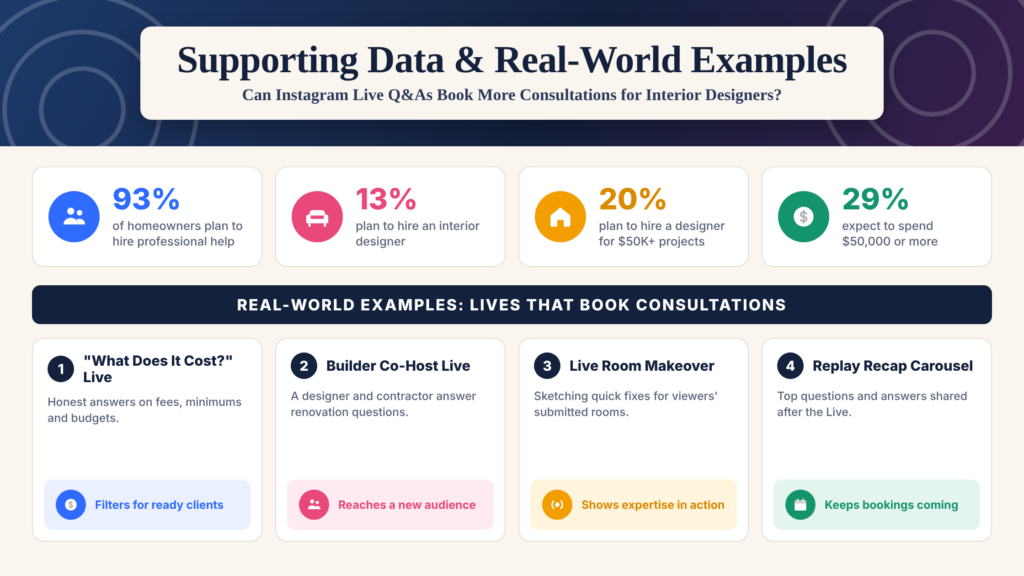
Key figures from Houzz’s 2026 Renovation Plans Report (1,034 US homeowners):
- 93% plan to hire professional help for their 2026 projects.
- 13% plan to hire an interior designer.
- 20% plan to hire an interior designer for projects of $50,000 or more.
- 29% estimate their project budget at $50,000 or more.
The survey covers Houzz users, so it reflects homeowners already researching renovations rather than every homeowner. It does not measure Instagram Lives directly. But it shows that homeowners planning larger projects are the ones most likely to hire a designer, and those are exactly the people who benefit from seeing a designer explain budgets and process openly.
Each designer should track their own Live attendance, enquiries, and consultations booked. The examples below are illustrative scenarios.
Example 1: The “What Does It Cost?” Live
A designer hosts a Live answering questions about fees, minimum budgets, and how projects are priced.
The honest answers filter out viewers who are not ready, while those with suitable budgets book discovery calls with confidence.
Example 2: The Builder Co-Host Live
A designer invites a local contractor to co-host a Live about planning a kitchen renovation. Together, they answer questions about timelines, permits, and design choices.
The Live reaches both audiences and positions the designer as part of a trusted local team.
Example 3: The Live Room Makeover
Followers submit photos of a tricky room before the Live. During the broadcast, the designer sketches quick fixes for two or three of them.
Viewers see the designer’s thinking in action, and several request consultations for their own homes.
Example 4: The Replay Recap Carousel
After each Live, the designer posts a carousel of the five best questions and answers, with a link to book a consultation.
Followers who missed the Live still get the value, and enquiries continue for days after the broadcast.
How to Turn One Live Into Multiple Posts
A single 30-minute Live Q&A can supply content for weeks:
- A promo post and countdown Stories before the Live
- The Live replay, saved to your profile or shared as a Reel
- Three to five short clips answering individual questions
- A recap carousel of the best questions and answers
- A quote graphic with your most useful tip
- An FAQ section for your website, based on real questions
- An email to your list with a link to the replay
- A follow-up Story inviting viewers to book a consultation
This turns one hour of preparation and broadcasting into a steady stream of trust-building content.
If you want help planning, promoting, and repurposing Lives without taking time away from client projects, Socinova’s social media management services cover content planning, design, captions, and scheduling at a flat monthly rate.
Conclusion: Can Instagram Live Q&As Really Book More Consultations for Interior Designers?
Yes. Instagram Live Q&As can book more consultations by answering the questions that stop followers from reaching out, showing the designer’s expertise in real time, and ending with a clear invitation to book.
The most effective Lives have a focused theme, are promoted in advance, answer honest questions about cost and process, and are followed up quickly.
Pick one topic. Promote it early. Answer the hard questions. Show your work. Then track consultations booked, not just viewers.
Go live. Be honest. Show your thinking. Make it easy to book.
That is how an Instagram Live turns a quiet follower into your next client.